WDG’s Top Tools for Project Management
At WDG, great digital work starts long before a line of code is written or a design is finalized — it starts with effective project management. Managing multiple client projects, tight deadlines, and cross-functional teams requires not only skill but also the right set of tools.
From web design and development to content strategy and UX, each WDG project depends on seamless communication, time tracking, and organization. The right project management tools don’t just make work easier — they make collaboration more transparent, deadlines more manageable, and results more predictable.
Below, we’re sharing WDG’s top project management tools, the platforms we rely on every day to keep projects on track, our team connected, and clients in the loop.
Key Takeaways
- Project management tools help creative and technical teams stay aligned and efficient.
- WDG uses different platforms for different needs — from time tracking to client communication.
- Confluence, Jira, and Slack each bring unique strengths to managing digital projects.
- The right tool depends on your workflow, team size, and level of client collaboration.
- Integrating the right mix of software supports clear communication and accountability.
Top Project Management Tools for Agencies and Teams
Project management isn’t one-size-fits-all. The tools you choose should reflect your workflow and your team’s communication style. At WDG, we combine several platforms to manage projects holistically — one for planning and documentation, another for development and issue tracking, and one for real-time team communication. This integrated approach keeps everyone aligned and accountable from kickoff to launch.
Here are the tools we trust most to keep our projects running smoothly.
Confluence: Organizing Projects and Knowledge in One Place
Every great project starts with clear documentation — and that’s where Confluence comes in. WDG uses Confluence as our central hub for organizing project information, meeting notes, requirements, and timelines. Everything from creative briefs to sprint retrospectives lives here, keeping our entire team and clients on the same page.
By structuring content into easy-to-navigate spaces, Confluence helps us document progress, track feedback, and preserve knowledge throughout a project’s lifecycle. It’s our go-to tool for collaboration, alignment, and long-term clarity.
Jira: Managing Tasks, Issues, and Development Workflows
When it comes to managing complex web design and development projects, Jira is our workhorse. We use Jira to track tasks, organize sprints, and manage issue resolution — helping us see where every project stands at a glance.
Jira allows our design, strategy, and development teams to collaborate seamlessly. We can assign tasks, set priorities, and visualize workloads across timelines. Each sprint includes detailed status updates and milestones, ensuring projects stay on schedule and teams stay coordinated.
From agile boards to progress reports, Jira keeps every piece of the puzzle connected — ensuring transparency and accountability across every WDG project.
Slack: Real-Time Communication and Collaboration
At WDG, communication moves fast — and Slack helps us keep up. Slack is our central space for real-time collaboration, allowing our team to stay connected whether we’re in the office or remote.
Each Slack channel allows designers, developers, and strategists share updates, ask questions, and exchange quick feedback. The platform integrates seamlessly with other tools we use, including Jira and Confluence, so updates flow naturally into our daily conversations.
Slack helps reduce email clutter, speed up responses, and keep projects moving. It’s how our team stays collaborative, connected, and focused from one phase to the next.
Other Project Management Tools Worth Considering
While Confluence, Jira, and Slack form WDG’s core toolkit, there are many other platforms that teams can explore depending on their size, structure, and workflow. The right choice depends on how your organization collaborates and what kind of visibility or automation you need.
Below are several additional tools commonly used in web design and development agencies, along with what makes each one stand out.
Toggl
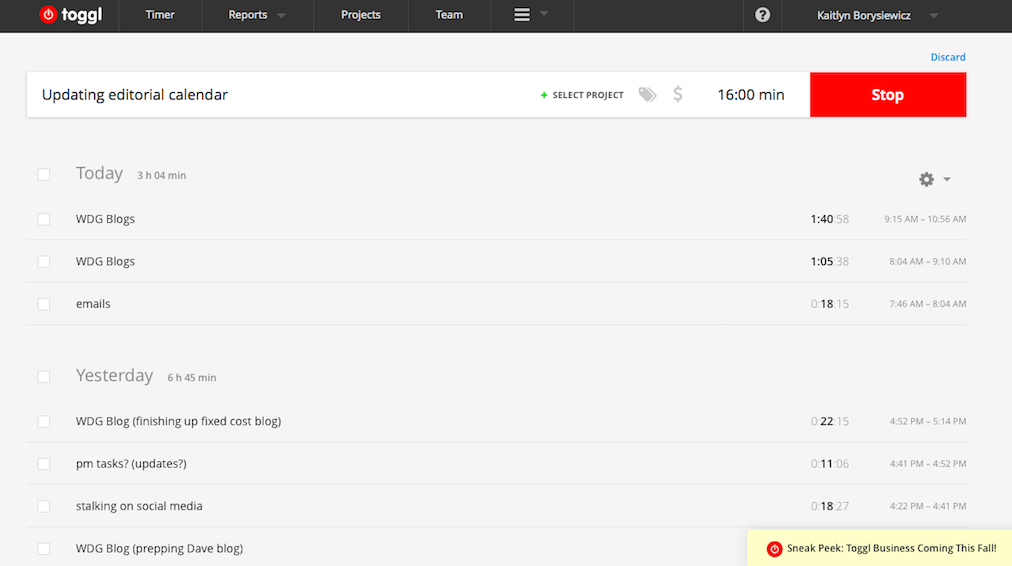
Toggl is a simple, accurate time-tracking tool that helps teams monitor hours across projects and clients. Its intuitive interface makes logging time and reviewing progress straightforward for any size team.
- Ideal for agencies needing transparency around project hours and resource planning.
- Allows time entries by project, client, or tag, with detailed notes for context.
- Includes reporting tools for forecasting workloads and analyzing efficiency.
Basecamp
Basecamp keeps conversations, files, and schedules in one organized space. It’s a great client-friendly option that eliminates email clutter and keeps communication consistent.
- Combines message boards, to-do lists, and shared calendars for complete visibility.
- Helps teams and clients stay aligned with clear deadlines and file organization.
- Great for agencies that value simple, centralized project collaboration.
Asana
Asana is a flexible project management platform that helps teams assign tasks, manage timelines, and track deliverables with ease. Its clear structure makes collaboration simple across departments.
- Perfect for managing multi-step projects and tracking individual task progress.
- Supports task dependencies, attachments, comments, and drag-and-drop organization.
- Ideal for teams needing visibility into priorities, workloads, and deadlines.
Trello
Trello offers a visual way to organize and track projects through boards, lists, and cards. It’s fast, flexible, and designed for teams that prefer a straightforward, visual workflow.
- Lets users add checklists, due dates, and attachments for quick task management.
- Useful for planning sprints, brainstorming, or mapping high-level initiatives.
- Great for teams that want clarity and flexibility without added complexity.
Monday.com
Monday.com combines colorful visuals with powerful automation. Its customizable boards and templates allow teams to map workflows, track progress, and manage complex timelines.
- Ideal for agencies needing project dashboards that scale as teams grow.
- Features include automation rules, Slack and Google Drive integrations, and workload tracking.
- Great for organizations that value visual reporting and transparency.
ClickUp
ClickUp offers a balance between task management, documentation, and time tracking — all within one platform.
- Perfect for teams that want to reduce app overload by consolidating tools.
- Highly customizable, allowing users to switch between list, board, or timeline views.
- Useful for agencies managing multiple projects simultaneously with varying levels of detail.
Notion
Notion is a flexible workspace that combines notes, tasks, databases, and wikis.
- Ideal for documentation-heavy projects that require centralized information management.
- Allows agencies to maintain project wikis, style guides, or process documentation in one place.
- Great for combining project tracking with internal knowledge management.
Choosing the Right Project Management Tool for Your Team
No single tool can handle every aspect of project management perfectly — and that’s okay. The key is understanding what your team needs most.
When choosing tools, consider:
- Team size and structure: Larger teams may need specialized platforms, while smaller ones benefit from all-in-one tools.
- Project complexity: Simple workflows can thrive in Trello; large-scale builds might require Asana’s task dependencies.
- Client involvement: If you need transparency and shared communication, Basecamp shines.
- Tracking needs: For detailed time management and reporting, Toggl is essential.
At WDG, we strategically blend tools rather than relying on a single platform. Each plays a unique role — together, they create a system that supports collaboration, accountability, and visibility into progress.
Partnering with WDG for Smarter Project Management
Behind every successful digital project is a great process — and great processes rely on great tools. At WDG, our use of platforms like Toggl, Basecamp, Asana, and Trello reflects how we manage projects: collaboratively, transparently, and with precision.
We understand that strong project management is as important as creative vision or technical skill. Our team uses these tools to keep communication open, milestones visible, and outcomes measurable — ensuring every project stays aligned with client goals.
Whether you’re launching a new website, redesigning a digital platform, or planning your next campaign, WDG brings structure, strategy, and the right tools to every partnership. Contact us today to get started!
Interested in learning about more web design and development tools? Check out our other articles:
FAQs about Project Management Tools
What are the most important features of project management tools?
Look for tools that offer clear task organization, deadline tracking, and communication spaces. Integration with calendars and chat platforms is also key.
Which tool is best for small teams?
Trello and Asana both excel for smaller teams — Trello for its visual simplicity, Asana for its structured task tracking.
How do agencies use project management tools differently?
Agencies like WDG often combine multiple tools: one for time tracking (Toggl), one for client communication (Basecamp), and one for internal coordination (Asana or Trello).
Do I need multiple tools, or just one?
It depends on your workflow. Teams handling complex projects often use more than one to balance collaboration and efficiency.
How can WDG help my organization improve project management?
WDG helps teams implement proven systems and strategies for smoother workflows — combining process, technology, and communication to keep every project on schedule and aligned with goals.
Related Insights